
The Evolution of Containerization: Why Web Developers Can’t Ignore Docker and Kubernetes in 2025
The landscape of web development has shifted. In previous years, containerization was often seen as "the DevOps team's problem." However, as we move into 2025 and 2026, the boundary between writing code and managing its execution environment has evaporated. With the rise of AI-integrated workflows, micro-frontend architectures, and platform engineering, Docker and Kubernetes have become as fundamental to a web developer’s toolkit as Git or TypeScript.
Modern web applications are no longer just a collection of static files or a single monolithic server. They are complex ecosystems involving local LLMs (Large Language Models), vector databases, and distributed edge functions. Docker provides the consistency needed to package these diverse components, while Kubernetes offers the orchestration to ensure they remain resilient and scalable.
This guide explores the current state of containerization, focusing on the latest features in Docker 4.50+ and Kubernetes v1.33, and how you can leverage them to build faster, more secure web applications.
Modern Docker: Streamlining the "Inner Loop"
For web developers, the "inner loop" is the cycle of coding, testing, and debugging. Historically, Docker added friction to this process—waiting for builds to finish was a common productivity killer. In 2025, Docker has pivoted toward "zero-friction" development.
Docker Init and Docker Debug
One of the most significant additions is docker init. Instead of manually scouring StackOverflow for the perfect Dockerfile for your Next.js or Go backend, you can simply run:
docker initThis utility scans your project and generates optimized Dockerfile, .dockerignore, and compose.yaml files tailored to your specific framework.
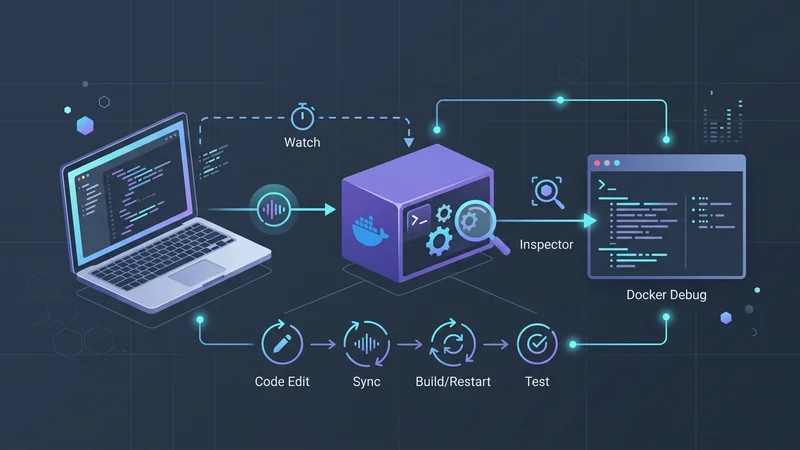
Furthermore, Docker Debug (introduced in version 4.50+) solves the "slim image" dilemma. Developers often use "distroless" or minimal images for security, but these are notoriously hard to debug because they lack a shell. Docker Debug provides a built-in, language-agnostic toolset that attaches to any container—even those without a shell—allowing you to inspect the filesystem and process state without bloating your production image.
Real-Time Development with Compose Watch
The days of manual docker-compose up --build after every CSS change are over. Docker Compose "Watch" mode allows for sub-second synchronization between your local source code and the container.
# compose.yaml
services:
  web:
    build: .
    ports:
      - "3000:3000"
    develop:
      watch:
        - action: sync
          path: ./src
          target: /app/src
          ignore:
            - node_modules/
        - action: rebuild
          path: package.json
With this configuration, changes to your src directory are instantly synced to the running container, while changes to package.json trigger an automatic image rebuild.
Kubernetes for Web Developers: Beyond the Hype
If Docker is about packaging, Kubernetes (K8s) is about survival. As a web developer, you don't need to be a cluster administrator, but you do need to understand how Kubernetes v1.32 ("Penelope") and v1.33 handle your application's lifecycle.
Native Sidecar Containers
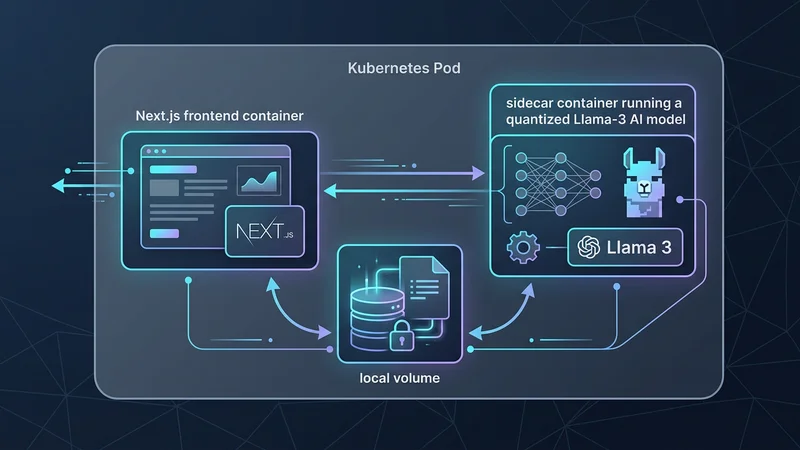
A major pain point in Kubernetes was the lifecycle of sidecar containers (e.g., logging agents or auth proxies). Previously, sidecars might shut down before the main app finished processing a final request, leading to data loss. In v1.33, Native Sidecar Containers have reached General Availability. You can now define a container as a sidecar, ensuring it starts before your app and shuts down after your app, providing a seamless experience for service meshes like Istio or Linkerd.
In-Place Pod Vertical Scaling
Traditionally, changing the CPU or memory limits of a Pod required a full restart. For a high-traffic React/Node.js app, this meant a brief period of unavailability or the need for complex rolling updates. Modern Kubernetes now supports In-Place Pod Vertical Scaling. You can update resource requests/limits on the fly, and the Kubelet will adjust the container's resources without killing the process—perfect for handling sudden spikes during a product launch.
The Gateway API: The Successor to Ingress
For years, the Ingress API was the standard for routing external traffic to web services. However, it was limited and often required vendor-specific annotations. The Kubernetes Gateway API is now the standard. It provides a more expressive, role-oriented way to manage traffic, making it easier for developers to define blue-green deployments or canary releases directly in their manifests.
Architecting Web Apps: Multi-Stage Builds and AI Integration
Building efficient images is no longer optional. In an era of "pay-per-byte" cloud storage and ephemeral environments, your image size directly impacts deployment speed and cost.
Standardized Multi-Stage Builds
For a modern TypeScript/Node.js application, a multi-stage build is the gold standard. It ensures that your final production image contains only the necessary artifacts, excluding devDependencies and source code.
# Stage 1: Build
FROM node:22-alpine AS builder
WORKDIR /app
COPY package*.json ./
# Use npm ci for deterministic builds in CI/CD
RUN npm ci
COPY . .
RUN npm run build

# Stage 2: Runtime
FROM node:22-alpine AS runner
# Set the environment to production
ENV NODE_ENV=production
# Run as a non-root user for security
USER node
WORKDIR /app
# Copy only the compiled output and necessary modules
COPY --from=builder /app/dist ./dist
COPY --from=builder /app/node_modules ./node_modules
COPY --from=builder /app/package.json ./package.json

EXPOSE 3000
CMD ["node", "dist/main.js"]
AI-Native Containers and DRA
The biggest trend in 2025 is the integration of AI features directly into web apps. Whether you are running a local LLM for data privacy or a vector database for RAG (Retrieval-Augmented Generation), Kubernetes has evolved to support these workloads.
Dynamic Resource Allocation (DRA) allows Kubernetes to manage GPUs as first-class citizens. Web developers can now request GPU fractions for inference tasks within their Pod specs, similar to how they request CPU or RAM.
Security and Performance: Avoiding Common Pitfalls
As the complexity of containerized environments grows, so does the surface area for errors. Below are the most common pitfalls web developers face and the strategies to mitigate them.
| Pitfall | Consequence | Prevention Strategy |
|---|---|---|
Broad COPY . . |
Secrets (like .env) or local logs leaked into image layers. |
Use a strict .dockerignore and scan images with Docker Scout. |
| Missing Resource Limits | "Noisy Neighbor" syndrome; one service consumes all Node RAM. | Always define resources: limits and requests in K8s manifests. |
Using :latest Tags |
Non-deterministic deployments; impossible to roll back reliably. | Use semantic versioning (e.g., :v1.2.4) or SHA digests. |
| Running as Root | Increased risk of container escape vulnerabilities. | Always include USER node or a specific UID in your Dockerfile. |
| Ignoring Probes | Traffic sent to containers that are still booting or crashed. | Implement livenessProbe and readinessProbe for every service. |
Implementing Probes in Node.js
A common mistake is neglecting the health of the container. Kubernetes needs to know when your app is ready to receive traffic.
// A simple Express.js readiness check
app.get('/healthz/ready', (req, res) => {
  // Check DB connection, cache, etc.
  const isDbConnected = checkDbStatus();
  if (isDbConnected) {
    res.status(200).send('Ready');
  } else {
    res.status(503).send('Service Unavailable');
  }
});
In your Kubernetes manifest:
readinessProbe:
  httpGet:
    path: /healthz/ready
    port: 3000
  initialDelaySeconds: 5
  periodSeconds: 10
The 2025 Tooling Landscape
The ecosystem around Docker and Kubernetes has matured, offering tools that make management significantly easier for developers.
- OrbStack: For macOS users, OrbStack has largely replaced Docker Desktop for many due to its significantly lower CPU and memory overhead and lightning-fast startup times.
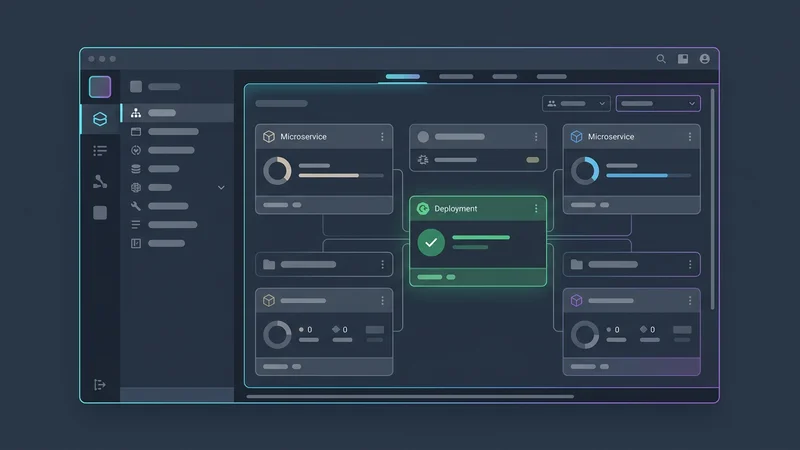
- Lens / OpenLens: Known as the "IDE for Kubernetes," Lens provides a visual interface for exploring clusters, viewing logs, and even opening terminal shells into pods without remembering complex
kubectlcommands. - KEDA (Kubernetes Event-driven Autoscaling): While K8s scales based on CPU/RAM, KEDA allows you to scale your web pods based on application-level events, such as the number of messages in a RabbitMQ queue or the latency of a Prometheus metric.
- Trivy: This is the industry standard for security. Integrate Trivy into your CI/CD pipeline to scan your Dockerfiles and Kubernetes YAMLs for misconfigurations and vulnerabilities before they reach production.
Frequently Asked Questions
Is it really necessary for web developers to learn Docker?
Yes, Docker has become the industry standard for ensuring environment consistency across development, staging, and production. Learning Docker allows you to package dependencies and runtime environments, eliminating the "it works on my machine" problem entirely.
What is the difference between Docker and Kubernetes?
Docker is a tool used to create, distribute, and run individual containers on a single host. Kubernetes is an orchestration platform that manages clusters of containers, handling scaling, load balancing, and self-healing across multiple machines.
Should I learn Docker or Kubernetes first?
You should definitely learn Docker first, as it provides the foundational building blocks (containers) that Kubernetes manages. Understanding how to build and run a single container is a prerequisite for understanding how to orchestrate hundreds of them in a cluster.
Can I use Docker without Kubernetes for small projects?
Absolutely; for small projects or simple side apps, Docker Compose or a "Platform as a Service" (PaaS) like Railway or Render is often sufficient. Kubernetes is generally reserved for applications that require high availability, complex scaling, or microservice orchestration.
How does Kubernetes improve web application scalability?
Kubernetes improves scalability through features like the Horizontal Pod Autoscaler (HPA), which automatically adds more instances of your app based on traffic. It also manages load balancing and traffic routing, ensuring that new instances start receiving requests immediately without manual configuration.
Conclusion
In 2025 and 2026, the roles of "Developer" and "Operator" continue to merge into the discipline of Platform Engineering. For web developers, Docker and Kubernetes are no longer just deployment targets; they are the canvas upon which modern, resilient, and AI-powered applications are built.
By mastering the "inner loop" with tools like Docker Compose Watch and docker init, and understanding the "outer loop" with Kubernetes sidecars and the Gateway API, you position yourself at the forefront of the industry. The goal isn't just to write code that runs—it's to write code that scales, survives, and succeeds in a cloud-native world. Start small, containerize your current project, and gradually explore the orchestration power that Kubernetes provides. The future of the web is containerized.