
Mastering Modern CI/CD: A Deep Dive into GitHub Actions in 2026
The landscape of software delivery has shifted dramatically over the last few years. In 2026, Continuous Integration and Continuous Deployment (CI/CD) is no longer just about running tests and pushing code to a server; it has evolved into a sophisticated orchestration of security hardening, cost-efficient scaling, and autonomous "agentic" workflows. GitHub Actions has emerged as the undisputed leader in this space, moving beyond a simple automation tool to become the central nervous system of the modern development lifecycle.
For senior web developers and DevOps engineers, staying ahead means understanding more than just YAML syntax. It requires a grasp of how to leverage the latest 2025–2026 updates—such as YAML anchors, OIDC-based authentication, and the integration of AI agents—to build pipelines that are not only fast but resilient and secure by design.
The 2026 Landscape: What’s New in GitHub Actions?
As of early 2026, GitHub has introduced several transformative features that address long-standing developer pain points while preparing for an AI-native future.
YAML Anchors and the Quest for DRY Workflows
One of the most requested features in GitHub’s history finally arrived in late 2025: support for YAML anchors and aliases. Historically, developers had to rely on Reusable Workflows or Composite Actions to avoid duplication. Now, you can define a block of configuration once and reuse it multiple times within the same file.
However, a critical nuance remains: as of early 2026, GitHub does not yet support "merge keys." This means you can reuse a block, but you cannot partially override its properties. You are essentially creating a direct pointer to a configuration block. This is a massive win for standardizing environment variables or complex step configurations across multiple jobs in a single workflow.
The Rise of Agentic Workflows
The "Technical Preview" of GitHub Agentic Workflows in 2025 has moved into broader adoption. This allows GitHub Copilot agents to not only suggest code but to actively participate in the CI/CD process. Imagine a pipeline that fails a linting check, triggers a Copilot agent to fix the formatting, commits the fix, and restarts the build—all without human intervention. These agentic steps are defined in the workflow YAML, providing a bridge between static automation and autonomous development.
Infrastructure and Pricing Shifts
The infrastructure powering our builds has also seen a significant refresh. New runner images for Windows Server 2025 (bundled with Visual Studio 2026) and macOS 26 (supporting both Intel and Apple Silicon) are now the standard.
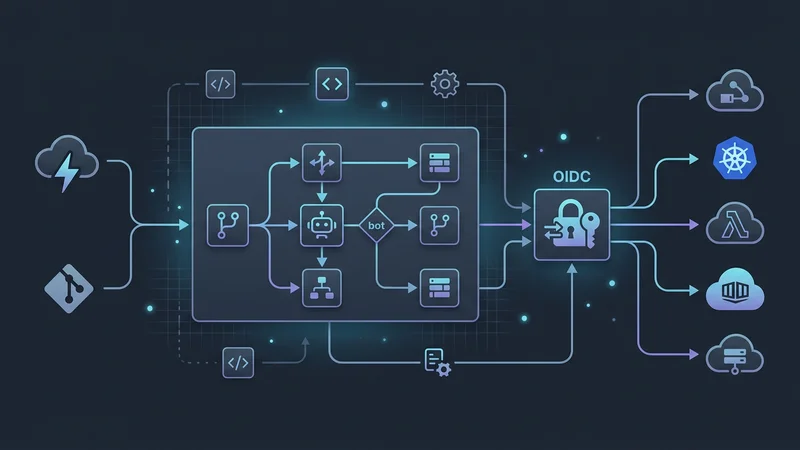
Perhaps the most significant change for enterprise users is the new pricing model for self-hosted runners. Starting March 1, 2026, GitHub introduced a nominal orchestration fee ($0.002/min) for self-hosted runners. While this is significantly cheaper than GitHub-hosted runners, it marks a shift in how organizations must budget for their private infrastructure. To help manage this, the new Runner Scale Set Client (a standalone Go-based SDK) has replaced the legacy Actions Runner Controller (ARC) for many, allowing for more granular, Kubernetes-free autoscaling.
Architecting Modular and Scalable Workflows
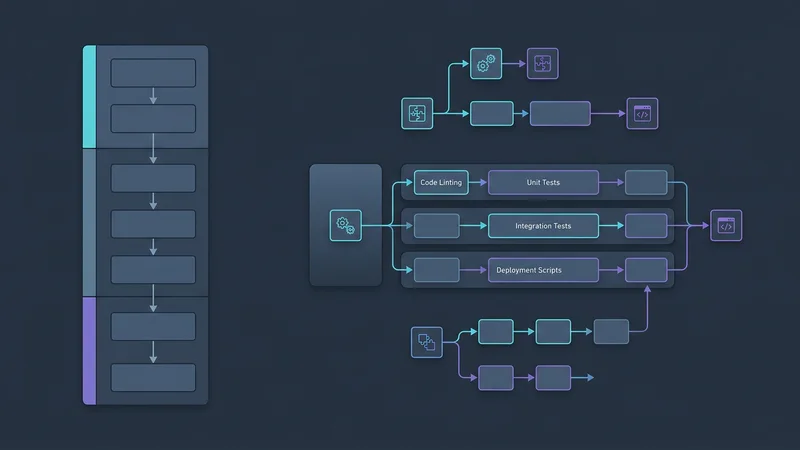
Building a pipeline for a large-scale TypeScript application requires a modular approach. In 2026, the distinction between Reusable Workflows and Composite Actions is the cornerstone of a "DRY" (Don't Repeat Yourself) strategy.
Reusable Workflows vs. Composite Actions
Choosing the right tool for modularity is essential for long-term maintainability.
- Reusable Workflows: These allow you to reuse entire jobs or even entire pipelines. They are best for enforcing organizational standards, such as a "standard CI" that includes security scanning, linting, and testing. They are called using the
useskeyword at the job level. - Composite Actions: These package a sequence of steps within a single job. They are ideal for "DRYing" up repetitive setup logic, such as installing a specific version of a runtime, configuring a private registry, and warming up a cache.
Advanced Matrix Strategies and Partitioning
Matrix builds have evolved beyond simply testing multiple Node.js versions. In 2026, we use Matrix Partitioning to solve the "long-tail" test problem. If you have a test suite that takes 40 minutes, you can dynamically split those tests into parallel chunks.
jobs:
  test:
    runs-on: ubuntu-latest
    strategy:
      matrix:
        # Splitting 1000 tests into 4 parallel batches
        partition: [1, 2, 3, 4]
    steps:
      - uses: actions/checkout@v6
      - uses: actions/setup-node@v6
        with:
          node-version: 24
          cache: 'npm'
      - name: Run Partitioned Tests
        run: npm test -- --partition=${{ matrix.partition }} --total-partitions=4
This strategy significantly reduces the "wall-clock" time of your CI, ensuring developers get feedback in minutes rather than hours.
Security Hardening: Protecting the Supply Chain
Security is the most critical aspect of CI/CD in 2026. With the rise of supply chain attacks, "security by default" is no longer an option—it is a requirement.
Eliminating Secrets with OIDC
The days of storing long-lived AWS Access Keys or Azure Service Principal secrets in GitHub Secrets are over. OpenID Connect (OIDC) is now the industry standard. OIDC allows GitHub Actions to request a short-lived, scoped JWT (JSON Web Token) from the cloud provider.
To enable this, your workflow must explicitly request the id-token: write permission. This follows the principle of least privilege, ensuring the token is only available to the jobs that truly need it.
// Example: A conceptual look at how OIDC replaces secrets
// Instead of: process.env.AWS_SECRET_ACCESS_KEY
// We use: The 'aws-actions/configure-aws-credentials' action which handles the OIDC exchange
Pinning Actions to Shas
While it is tempting to use uses: actions/checkout@v6, this exposes you to "tag shifting" risks. If a tag is hijacked or accidentally moved, your pipeline could run malicious code. The best practice in 2026 is to pin actions to a specific commit SHA and use a comment to track the version.
steps:
  - name: Checkout Code
    # Pinning to a specific SHA for security
    uses: actions/checkout@1d96c772d19495a3b5c517cd2bc0cb401ea0529f # v6.0.0
Minimal GITHUB_TOKEN Permissions
By default, the GITHUB_TOKEN can have broad permissions. Modern pipelines should always define a permissions block at the top of the YAML file to restrict access to only what is necessary.
permissions:
  contents: read    # Allow reading the repo
  packages: write    # Allow pushing to GitHub Packages
  id-token: write   # Required for OIDC
  security-events: write # Required for CodeQL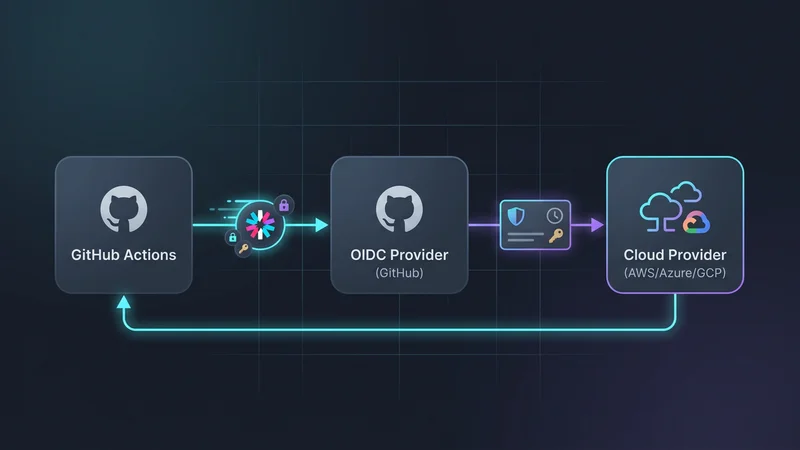
Performance Optimization and Cost Management
Efficiency in CI/CD is measured in both time and money. With the 2026 pricing changes, optimizing your runs has a direct impact on the bottom line.
Intelligent Caching
Inefficient caching is the primary cause of slow builds. Using actions/cache@v4 is standard, but many language-specific actions now have built-in caching logic that is more robust. For a TypeScript project using Node.js 24, the actions/setup-node@v6 action handles the heavy lifting.
- uses: actions/setup-node@v6
  with:
    node-version: 24
    cache: 'npm' # Automatically caches ~/.npm
Furthermore, utilizing build artifacts correctly allows you to pass data between jobs without re-running expensive build steps. For example, you should build your TypeScript application once and upload the dist folder, then download it in subsequent deployment or testing jobs.
Concurrency and Timeouts
To avoid wasting CI minutes on "stale" builds, use the concurrency key. This is particularly useful for Pull Requests. If a developer pushes three commits in quick succession, GitHub will cancel the first two runs and only finish the latest one.
concurrency:
  group: ${{ github.workflow }}-${{ github.ref }}
  cancel-in-progress: true
Additionally, always set a timeout-minutes value. The default GitHub timeout is 6 hours. If a test suite hangs due to a deadlock, it could consume 360 minutes of your quota. Setting a 15-minute timeout prevents these "zombie" runs from draining your budget.
Real-World Scenario: Deploying a TypeScript Microservice
Let’s look at a comprehensive example of a production-grade workflow for a TypeScript microservice. This workflow incorporates OIDC, monorepo path filtering, and security best practices.
name: Production Deployment

on:
  push:
    branches: [ main ]
    paths:
      - 'services/api/**'
      - 'packages/shared/**'
  pull_request:
    branches: [ main ]

permissions:
  id-token: write
  contents: read

jobs:
  build-and-test:
    runs-on: ubuntu-latest
    timeout-minutes: 10
    steps:
      - uses: actions/checkout@1d96c772d19495a3b5c517cd2bc0cb401ea0529f # v6

      - name: Setup Node.js
        uses: actions/setup-node@v6
        with:
          node-version: 24
          cache: 'npm'

      - name: Install Dependencies
        run: npm ci

      - name: Lint and Test
        run: |
          npm run lint
          npm test

      - name: Build TypeScript
        run: npm run build

  deploy-prod:
    needs: build-and-test
    if: github.event_name == 'push' && github.ref == 'refs/heads/main'
    runs-on: ubuntu-latest
    environment: production
    steps:
      - uses: actions/checkout@v6

      - name: Configure AWS Credentials (OIDC)
        uses: aws-actions/configure-aws-credentials@v4
        with:
          role-to-assume: arn:aws:iam::123456789012:role/github-actions-deploy
          aws-region: us-east-1

      - name: Deploy to ECS
        run: |
          echo "Deploying microservice to production cluster..."
          # Deployment logic here
In this example, we use paths filtering to ensure the pipeline only runs when relevant code changes. We also use the needs keyword to create a dependency graph, ensuring we only attempt a deployment if the tests pass.
Essential Tools and Libraries (2026 Edition)
To stay productive, you should be familiar with the latest versions of these core actions and tools:
| Tool | Version | Purpose |
|---|---|---|
actions/checkout |
v6 | High-performance repository fetching with enhanced credential security. |
actions/setup-node |
v6 | Native support for Node 24 and automatic pnpm/npm caching. |
docker/build-push-action |
v6 | Multi-platform builds with improved layer caching for 2026 OCI standards. |
github/codeql-action |
v3 | Deep semantic analysis to catch SQL injection and XSS before they hit production. |
slsa-framework/slsa-github-generator |
v2 | Generates SLSA Level 3 provenance, proving your build wasn't tampered with. |
dorny/paths-filter |
v3 | The go-to tool for complex monorepo logic that on: push: paths can't handle. |
Frequently Asked Questions
Is GitHub Actions a CI/CD tool?
Yes, GitHub Actions is a fully-featured CI/CD and automation platform. While it started as a way to automate repository tasks, it has evolved into a robust tool for building, testing, and deploying software to any cloud or on-premise infrastructure.
What is the difference between GitHub Actions and Jenkins?
GitHub Actions is a cloud-native, managed service integrated directly into the GitHub ecosystem, whereas Jenkins is a self-hosted, open-source automation server. Actions uses YAML for configuration and is generally easier to set up, while Jenkins offers extreme extensibility through its plugin ecosystem but requires significant maintenance.
How do I create a CI/CD pipeline in GitHub step by step?
First, create a .github/workflows directory in your repository and add a .yml file. Define your "trigger" (like a push to the main branch), specify the environment (like ubuntu-latest), and list the "steps" such as checking out code, installing dependencies, and running tests.
Is GitHub Actions free for private repositories?
GitHub Actions is free for public repositories, but private repositories have a limited number of free minutes and storage depending on your account plan. Once the free quota is exceeded, you are billed per minute based on the operating system of the runner used.
How do I trigger a GitHub Action manually?
To trigger a workflow manually, you must add the workflow_dispatch event to your YAML file under the on: section. Once added, a "Run workflow" button will appear in the Actions tab of your GitHub repository, allowing you to trigger it with optional custom inputs.
Conclusion
As we navigate through 2026, GitHub Actions continues to redefine what is possible in automated software delivery. The transition toward agentic workflows and the focus on OIDC-based security highlights a move toward pipelines that are not just faster, but smarter and more trustworthy.
By mastering modularity through reusable workflows, hardening your security posture with commit SHA pinning and minimal permissions, and optimizing costs via the new runner infrastructure, you position yourself at the forefront of modern web development. The goal of a senior developer is no longer just to "make the build pass," but to build a resilient, self-healing, and cost-effective delivery engine that empowers the entire engineering organization.